

LLM Prompts & Langfuse Integration
Overview & Architecture
We maintain a strict separation between application code, prompt definitions, and observability:
Core Principles
- Git is the Single Source of Truth: All prompts live in the
esp-promptsrepository. - Dynamic Ingestion via Langfuse: At runtime, services query Langfuse (
https://esplf.esprofiler.com) for the prompt version tagged with their target environment label (productionby default, orstagingin test environments). - Resilient Local Fallbacks: Every prompt declared in code includes a local classpath fallback file (e.g.
src/main/resources/intelligence/prompts/*.st) to ensure services start reliably even if Langfuse is unreachable. - Testing on Staging Before Production: Changes must always be verified on Staging before being promoted to
production. - Benchmarking & Evaluation (Future / TBD): Automated evaluation pipelines and benchmark datasets by the Data/AI team are planned for future releases. Developers can log data-tasks to contribute to this future benchmark suite.
Adding New Prompts
Follow these steps when creating a brand new prompt that has never existed in the platform or Langfuse.
Workflow Summary
Step 1: Backend Implementation (platform-api / api-cps)
esp-prompts or Langfuse to start coding or running unit tests. The backend service is completely functional locally because LangfusePromptService uses your local static classpath .st file whenever a remote prompt is not found or when running offline.1. Add the Static Fallback Prompt (.st file)
Static fallback prompt templates live under src/main/resources/ in your backend application:
src/main/resources/intelligence/prompts/— Standard copilot, insight, and platform agents (e.g.,insights/signal-evaluation.st,agent-copilot.st,agent-notebook.st).src/main/resources/agent-tasks/— Workflow-specific agents (e.g.,agent-tasks/general/,agent-tasks/product-comparison/).
Example: src/main/resources/intelligence/prompts/insights/signal-evaluation.st
You are an expert Cybersecurity Intelligence Analyst. Your task is to map a new observation (Finding) to the single best matching high-level trend (Signal) from a provided list of candidate Signals.

Strict Rule: A Finding can only belong to AT MOST ONE Signal.

Here is the Finding to evaluate:
Title: <finding.title>
Description: <finding.description>

Here are the candidate Signals:
<candidateSignals:{s |
- ID: <s.id>
  Title: <s.title>
  Description: <s.description>
  Type: <s.type>
}>
The variables injected are injected into the prompt when calling the agent service in Java.
{variable} and <variable> placeholders, object property access (<finding.title>), and collection iterations (<candidateSignals:{s | ...}>). Prompts are synchronized raw so that Spring Boot's StringTemplate engine compiles them directly.Understanding the Prompt Resolution & Cache Hierarchy
When langfusePromptService.getPrompt(PROMPT_NAME, fallbackPrompt) is called at runtime, it resolves the prompt through a 4-tier hierarchy:
- RAM Cache (
memoryCacheMap): Checked first (0ms latency, zero disk I/O). - Remote Langfuse Ingestion: If online and configured (
ESP_LLM_OBSERVATION_OTLP_ENDPOINT), fetches the version tagged withESP_LANGFUSE_PROMPTS_LABEL(productionorstaging). - Disk Cache (
resources/prompts/<prompt>.st&.version): Persisted on the container filesystem (configured viaesp.langfuse.prompts.cache-dir, defaults toresources/prompts/) so prompts survive network blips. - Local Classpath Fallback: If Langfuse is unreachable, disabled, or if the prompt hasn't been created in Langfuse yet, it falls back to your local
.stresource insrc/main/resources/.
2. Wire LangfusePromptService and ChatClient Advisor
In your Spring configuration class (e.g., SignalGenerationAgentConfig.java in esp-platform project), declare a ChatClient bean wrapped in ReloadableChatClient. This binds your feature to Langfuse, attaches OpenTelemetry tracing, and allows the prompt to be hot-reloaded dynamically at runtime:
@Configuration
public class SignalGenerationAgentConfig {

  private static final String SIGNAL_EVALUATION_PROMPT_NAME = "signal-evaluation";

  @Bean
  public ChatClient signalEvaluationAgent(
      @Value("classpath:intelligence/prompts/insights/signal-evaluation.st") Resource systemPrompt,
      GoogleGenAiChatModel chatModel,
      ObservedChatClientBuilder observedChatClientBuilder,
      LangfusePromptService langfusePromptService
  ) {
    // ReloadableChatClient enables zero-downtime hot-swapping of prompt updates
    return new ReloadableChatClient(SIGNAL_EVALUATION_PROMPT_NAME, () ->
        observedChatClientBuilder.from(chatModel, "signal-evaluation")
            // Dynamically loads from Langfuse with fallback to local classpath
            .defaultSystem(
                langfusePromptService.getPrompt(SIGNAL_EVALUATION_PROMPT_NAME, systemPrompt))
            .defaultOptions(GoogleGenAiChatOptions.builder()
                .model(IntelligenceLevel.MEDIUM.model)
                .includeThoughts(false))
            .defaultAdvisors(
                // Links OTel spans and Langfuse generation traces to this prompt & version
                new LangfusePromptObservationAdvisor(SIGNAL_EVALUATION_PROMPT_NAME,
                    langfusePromptService)
            )
            .build()
    );
  }
}
3. Calling the Agent Service in Java
Inject your configured ChatClient bean into your service (e.g., SignalGenerationService.java), passing parameters into the prompt using .system(s -> s.param(...)) or .system(s -> s.params(map)):
package com.esprofiler.platform.insight.service;

import com.esprofiler.platform.insight.dto.SignalGenerationResponses.SignalMatchResponse;
import com.esprofiler.platform.insight.entity.FindingEntity;
import com.esprofiler.platform.insight.entity.SignalEntity;
import java.util.List;
import lombok.RequiredArgsConstructor;
import lombok.extern.slf4j.Slf4j;
import org.springframework.ai.chat.client.ChatClient;
import org.springframework.beans.factory.annotation.Qualifier;
import org.springframework.stereotype.Service;

@Slf4j
@Service
@RequiredArgsConstructor
public class SignalGenerationService {

  @Qualifier("signalEvaluationAgent")
  private final ChatClient signalEvaluationAgent;

  public SignalMatchResponse evaluateFinding(FindingEntity finding, List<SignalEntity> candidates) {
    return signalEvaluationAgent.prompt()
        // Passes 'finding' object and 'candidateSignals' collection into the template
        .system(s -> s
            .param("finding", finding)
            .param("candidateSignals", candidates))
        .user("Please evaluate this finding against the candidate signals.")
        .call()
        .entity(SignalMatchResponse.class);
  }
}
4. Open Backend Pull Request
Push your branch and open a PR in esp-platform or esp-cps. Follow standard code review guidelines and obtain approval.
Step 2: Create Prompt in esp-prompts Repository
Once your backend PR is reviewed and approved, create the prompt definition in esp-prompts.
1. Add the Prompt File
Place your prompt file in the corresponding folder:
platform/espi/— Copilot conversation agents and skills.platform/insights/— Automated findings, signals, and synthesis agents.cps/— Central Provider Service categorization and mapping engines.
Naming Convention: Use short, lowercase, hyphenated names matching your PROMPT_NAME constant (e.g. platform/insights/signals/my-feature.md or platform/espi/skills/my-feature-skill/SKILL.md).
2. Open PR in esp-prompts
Open a PR in esp-prompts referencing your backend PR:
Relates to ES-Profiler/platform-apim#1234
Adds the new prompt definition for the MyFeature assistant.
3. Merge to main (Automatic Staging Sync)
When merged into main in esp-prompts, GitHub Actions automatically triggers .github/workflows/sync-prompts-staging.yml:
- It uploads the new prompt to Langfuse.
- Labels the version as
staging. - Applies routing tags (e.g.
service-platform,domain-insights).
Step 3: Staging Verification & Testing
Verify that your new prompt works end-to-end on Staging:
- Deploy your backend branch/build to Staging with the staging label enabled:
ESP_LANGFUSE_PROMPTS_LABEL=staging - Trigger the feature in the staging UI or via API endpoint.
- Open the Langfuse Console:
- Under Prompts, verify that your prompt appears and the
staginglabel is assigned. - Under Tracing, inspect the execution trace and confirm that the generation span is linked to your prompt name and version.
- Under Prompts, verify that your prompt appears and the
Step 4: Open a Data-Task for Benchmarking (Optional / Future TBD)
If you wish to log a task for future benchmarking:
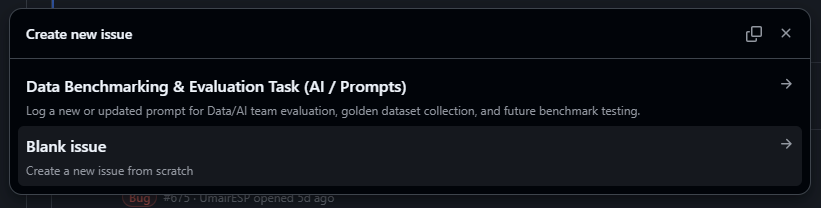
- In the repository, go to Issues > New Issue.
- Select the Data Benchmarking & Evaluation Task (AI / Prompts) template:
- Fill out the pre-populated form fields:
- Prompt Name in Langfuse: e.g.
signal-evaluation - Langfuse Version: e.g.
v1(currently taggedstaging) - Target Service & Related PRs: e.g.
platform-api (ES-Profiler/platform-api#1234, ES-Profiler/esp-prompts#56) - Objective & Functional Role: Purpose, input context parameters, and expected JSON output structure.
- Test Scenarios & Golden Dataset: Test cases or edge cases to populate the evaluation suite.
- Langfuse Reference URLs: Direct links to the prompt in Langfuse and sample staging trace.
- Prompt Name in Langfuse: e.g.
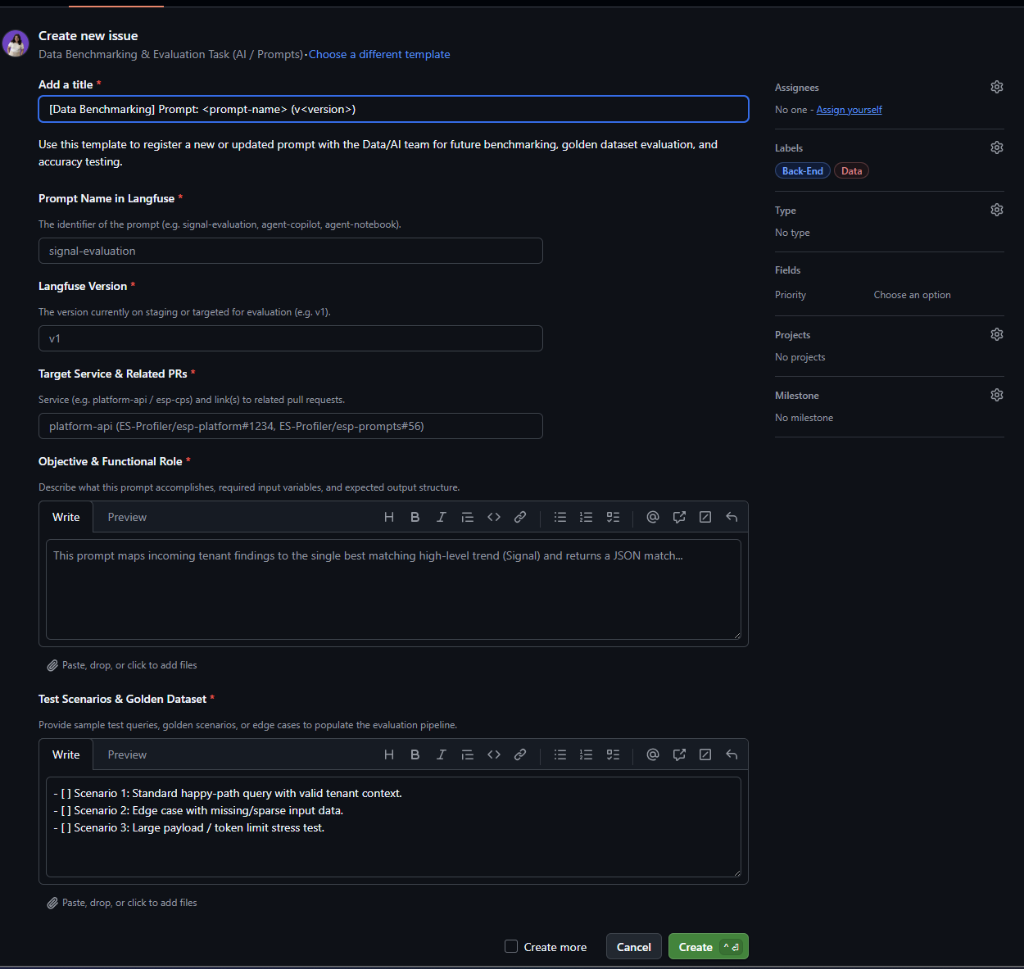
- The template automatically attaches the
DataandBack-Endlabels. Click Submit new issue.
Step 5: Promote Prompt to Production & Release Backend
Once staging testing is complete:
- Promote Prompt in
esp-prompts:- Go to Actions > Promote Prompts to Production.
- Enter your prompt name in the
promptsinput (e.g.my-feature). - Run workflow. Review the dry-run plan, and have a required reviewer approve the
productionenvironment gate.
- Release Backend Code:
- Merge and release the
platform-api/api-cpsPR. - Production containers boot up, query Langfuse for
label=production, and ingest the newly promoted prompt.
- Merge and release the
staging label (the version you tested), prints a dry-run diff in the plan step, and applies the production label only after review approval.Modifying Existing Prompts
When modifying a prompt that already exists in production, determine whether the change is prompt-content only or requires backend code changes.
Workflow Summary
Step 1: Determine Modification Type (Content-Only vs Code Changes)
Scenario A: Content-Only Modification (Zero-Downtime, No Backend Redeploy)
If you are refining prompt instructions, improving persona prompts, tuning few-shot examples, or reducing hallucinations:
- You do not need to touch
platform-apiorapi-cpscode immediately. - Go directly to
esp-promptsand edit the markdown prompt file. - Open a PR in
esp-prompts.
Scenario B: Modification with Backend Code Changes
If your prompt change involves adding/removing StringTemplate variables (e.g. <newVariable>), altering input/output JSON DTOs, or changing tool calls:
- Update the fallback
.stfile inplatform-apiorapi-cpsand modify the corresponding Java classes. - Open a PR in
platform-api/api-cpsand obtain review approval. - Update the prompt file in
esp-promptsto match the new variable schema and open a matching PR inesp-prompts.
Step 2: Merge to main in esp-prompts (Staging Sync)
When your esp-prompts PR merges to main, the sync-prompts-staging.yml workflow triggers automatically:
- Langfuse creates a new version (e.g.
v3) with your updated prompt. - The
staginglabel moves to this new version. - The
productionlabel remains untouched on the existing live version (e.g.v2).
Before Sync:   staging -> v2 (live)      production -> v2 (live)
After Sync:    staging -> v3 (updated)   production -> v2 (live)
Step 3: Verify on Staging
- On the Staging environment (
ESP_LANGFUSE_PROMPTS_LABEL=staging), execute the modified workflow. - Check the Langfuse Tracing dashboard to verify:
- The trace links to the new
stagingversion number (e.g.v3). - The LLM response meets expectations and adheres to formatting.
- The trace links to the new
Step 4: Promote Prompt to Production
- Go to Actions in
esp-prompts> Promote Prompts to Production. - Enter the specific prompt name in the
promptsinput (e.g.my-feature) to promote only the targeted prompt. - Click Run workflow:
- The
planjob prints a dry-run diff of the versions that will move. - The workflow pauses at the
productionenvironment review gate. - Once approved, the job copies the staging version and labels it
production.
- The
After Promotion: staging -> v3 production -> v4 (copy of v3)
staging, allowing you to inspect the version diff during the plan step prior to approval.Step 5: Ingest Prompt Updates (Automatic vs Instant Refresh)
After promoting a prompt in Langfuse, backend services pick up the change without restarting:
- Automatic Quartz Refresh: The backend background job runs every 20 minutes and automatically fetches updated prompt versions.
- Instant Manual Trigger: If you need the change to take effect immediately without waiting for the 20-minute timer, trigger the prompt refresh Quartz job via the API endpoint:
curl -X PATCH "https://platform.esprofiler.com/api/v1/schedules/run" \
  -H "Content-Type: application/json" \
  -H "Authorization: Bearer <API_OR_SSO_TOKEN>" \
  -d '{
    "jobName": "langfusePromptRefreshJob",
    "groupName": "DEFAULT"
  }'
platform-api updates its RAM and disk cache immediately upon running the schedule action. No container restart or deployment is required!Quartz Scheduled Ingestion & Manual Refresh API
Quartz Background Job Configuration
Backend services run a background Quartz job dedicated to refreshing dynamic prompts:
| Attribute | Value / Default | Description |
|---|---|---|
| Job Name | langfusePromptRefreshJob | Identifier of the Quartz job bean. |
| Job Group | DEFAULT | Quartz job group. |
| Trigger Name | Langfuse Prompt Refresh Trigger | Quartz trigger bean name. |
| Startup Delay | 15 minutes (TimeUnit.MINUTES.toMillis(15)) | Initial delay after server boot before first periodic sweep. |
| Repeat Interval | 20 minutes (1200000 ms) | Frequency of automatic prompt refresh sweeps. |
| Configuration Property | esp.langfuse.prompts.refresh-interval-ms | Config property to customize the repeat interval. |
| Environment Variable | ESP_LANGFUSE_PROMPTS_REFRESH_INTERVAL_MS | Override via container environment variable. |
Triggering Manual Prompt Refresh via API
You can trigger langfusePromptRefreshJob at any time using the Schedule Management API:
- Endpoint:
PATCH /api/v1/schedules/run - Controller:
ScheduleController.admScheduleRunAction - Swagger UI: Accessible at
/api/v1/docs/uiunder tagZ1 - Schedule Management(Z2.02 -- admScheduleRunAction) - Security: Requires
ESP-SSOauthentication orX-API-KEY.
Request Example (JSON)
PATCH /api/v1/schedules/run HTTP/1.1
Host: platform.esprofiler.com
Content-Type: application/json
Authorization: Bearer <AUTH_TOKEN>

{
  "jobName": "langfusePromptRefreshJob",
  "groupName": "DEFAULT"
}
Success Response
{
  "success": true,
  "message": "Task run request processed!"
}
Technical Reference & Best Practices
Environment Configuration & Target Labels
Backend services configure which prompt versions to fetch via the ESP_LANGFUSE_PROMPTS_LABEL environment variable (mapped to esp.langfuse.prompts.label):
| Environment | Configured Label (ESP_LANGFUSE_PROMPTS_LABEL) | Behavior & Purpose |
|---|---|---|
Staging (stage) | staging | Always reads staging prompts. Picks up the latest prompts merged into main in esp-prompts for verification before release. |
Production (prod) | production | Always reads production prompts. Strictly uses versions that have passed through the promotion review gate in GitHub Actions. |
Development (dev / Local) | production (default) | Defaults to production so local development mirrors live production behavior. Can be overridden to staging in local properties or IDE run configurations to test upcoming prompts. |
# Example: Switch local or test environment to read staging prompts
ESP_LANGFUSE_PROMPTS_LABEL=staging
Disabling Langfuse Prompt Sync During Local Testing
When testing local prompt changes or debugging offline, you can completely disable remote Langfuse prompt synchronization:
# In application-local.properties or your IDE Environment Variables
ESP_LANGFUSE_PROMPTS_ENABLED=false
# or in application.yml / properties:
esp.langfuse.prompts.enabled=false
What happens when prompt sync is disabled?
- Zero Remote Calls:
LangfusePromptServicecompletely skips remote HTTP requests to Langfuse. - Direct Classpath Fallback: Services immediately use your local
.sttemplate files fromsrc/main/resources/intelligence/prompts/on every invocation. - Bypasses Cache: Disk cache reads/writes and Quartz periodic refresh sweeps are bypassed.
- Instant Iteration: You can modify your local
.stfile and test changes immediately without any remote sync or cache invalidation.
Langfuse Labels & Tags Reference
1. Version Labels (Prompt Routing)
| Label | Managed By | Environment Target | Description |
|---|---|---|---|
staging | sync-prompts-staging.yml | Staging (stage) | Automatically assigned when a PR merges into main in esp-prompts. |
production | promote-prompts.yml | Production (prod), Dev (dev) | Assigned when a prompt is approved and promoted via the GitHub Action. |
latest | Langfuse Internal | None | Internal Langfuse pointer to the newest draft. DO NOT USE in application code. |
2. Metadata Tags (Filtering & Categorization)
Prompts in Langfuse are automatically tagged during CI sync to allow easy filtering:
- Service Tags:
service-platform— Prompts consumed byplatform-api.service-cps— Prompts consumed byapi-cps.
- Domain / Subsystem Tags:
domain-insights— Finding and Signal generation, emergence, and evaluation agents.domain-copilot— Interactive chat assistants, skills, and conversation namers.domain-tasks— Deep research, report generation, and background analyst workflows.domain-changelog— Changelog and revision comparison agents.
Environment Variables Summary
| Variable | Property | Default | Description |
|---|---|---|---|
ESP_LANGFUSE_PROMPTS_ENABLED | esp.langfuse.prompts.enabled | true | Enable/disable remote Langfuse prompt fetching. Set false for offline local testing. |
ESP_LANGFUSE_PROMPTS_LABEL | esp.langfuse.prompts.label | production | Target prompt label (production in Prod/Dev, staging in Staging). |
ESP_LANGFUSE_PROMPTS_CACHE_DIR | esp.langfuse.prompts.cache-dir | resources/prompts | Local container directory for caching fetched prompt templates on disk. |
ESP_LANGFUSE_PROMPTS_REFRESH_INTERVAL_MS | esp.langfuse.prompts.refresh-interval-ms | 1200000 (20m) | Interval in ms for the periodic Quartz background prompt refresh job. |
ESP_LLM_OBSERVATION_OTLP_ENDPOINT | esp.llm.observation.otlp.endpoint | "" | Langfuse OTLP endpoint (e.g. https://esplf.esprofiler.com/api/public/otel/v1/traces). |
ESP_LLM_OBSERVATION_OTLP_AUTH | esp.llm.observation.otlp.auth | "" | Base64-encoded Langfuse public and secret key (Basic <auth>). |
Caching Architecture in Spring Boot (LangfusePromptService)
To eliminate latency and avoid external API limits, LangfusePromptService implements a resilient multi-tier cache:
- RAM Cache (
ConcurrentHashMap): Instant prompt lookup during request processing. - Disk Cache (
resources/prompts/<prompt>.stand<prompt>.version): Persisted locally across container restarts. - Startup Ingestion: During
ApplicationReadyEvent, the service performs a remote ingestion sweep of all registeredReloadableChatClientbeans. - Periodic Refresh: Scheduled background Quartz job (
langfusePromptRefreshJob) periodically sweeps and reloads prompt updates from Langfuse every 20 minutes.
Troubleshooting Common Issues
- Prompt returns fallback content on startup:
- Check that
ESP_LLM_OBSERVATION_OTLP_ENDPOINTis configured correctly (e.g.https://esplf.esprofiler.com/api/public/otel/v1/traces). - Verify that
ESP_LANGFUSE_PROMPTS_LABELmatches the label present in Langfuse (stagingorproduction). - Check that the prompt name passed in Java matches the prompt name in Langfuse exactly.
- Check that
- HTTP 403 / Cloudflare WAF block during sync:
- Some prompts contain HTML/JavaScript snippets. Cloudflare WAF rules may block POST requests containing script tags.
- Ensure the Cloudflare WAF skip rule is configured for
/api/public/or thatLANGFUSE_EXTRA_HEADERScontains the appropriate bypass secret.
- Span not linked in Langfuse Traces:
- Ensure
new LangfusePromptObservationAdvisor(PROMPT_NAME, langfusePromptService)is registered indefaultAdvisorson theChatClient.
- Ensure